
Shipping Costs & Times
| Delivery Location | Purchase Amount $0 - $100.00 |
Purchase Amount Over $100.00 |
|---|---|---|
| Mexico and Canada | $85 | $85 |
| Contiguous 48 states | $15.95 | FREE |
|
Armed Forces Americas (AA) Armed Forces Outside Americas (AE) Alaska Armed Forces Pacific (AP) Guam Hawaii Puerto Rico |
$85.00 | $75.00 |
| International Orders | Please call (866) 990-4478 for shipping rates | |
Sorry, we cannot ship to P.O. Box addresses (UPS will not ship to a P.O. Box)
All orders are processed within one to two business days. We process orders that are placed on the weekends and on holidays on the following business day. During the holiday season, processing may take up to four business days.
We use standard UPS shipping to deliver your products, therefore we cannot ship to P.O. boxes. After the order has been processed, packaged and shipped from our warehouse, it can take anywhere from one to six business days before you will receive it. However, incomplete or incorrect addresses may result in longer delivery times and possible charges for redelivery. Please see the UPS map below to determine how long your order will take to be shipped from Fredericksburg, Texas to your continental U.S. location:
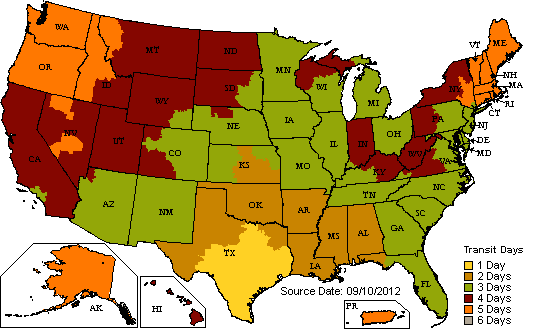
Time estimates excludes military addresses (APO/FPO), which are shipped via US mail.
To ship outside of the United States please call (866) 990-4478, Monday through Friday 8:00 a.m. - 5:00 p.m. CST to place your order.
How to Order Frequently Asked Questions

- What happens when I order a Gift Certificate?
-
We will send a Circle E Candles Gift Certificate ($20 minimum) to the recipient of your choice. You may have the gift certificate mailed through the US Postal Service or for faster receipt you may have the gift certificate emailed. x close
- What does 'Update Cart' do?
-
When you change the quantity of your item in the shopping cart, this button recalculates the price shown. You don't have to use this button unless you make changes on the cart page. x close
- What's an address label?
-
This is part of our address book feature. It's mainly used so you can recognize addresses you save in your address book. x close
- Why do you need a billing address?
-
It's a security measure. Credit card companies require us to confirm that your billing address is the same as the address for the credit card. x close
- How do I change my billing address?
-
Click on Add a New Address and enter the new address into your address book. You'll be sent back to the billing page and will see your new choice. Click on that selection's radio button to select that address. x close
- What do you do with all the information I provide?
-
Please see our Privacy Policy for information on how we use your information. x close
 Circle E Candles proudly owned and manufactured in the United States of America.